
Summarise this article with:
The One-Minute Version
GPS coordinates come in two common formats. Decimal degrees (DD) look like 40.7128, -74.0060 and work best with digital tools. Degrees, minutes, seconds (DMS) look like 40° 42' 46" N, 74° 0' 22" W and appear on paper charts and some specialized instruments. You can convert instantly with our Coordinate Converter, or do the math yourself in about four steps per direction.
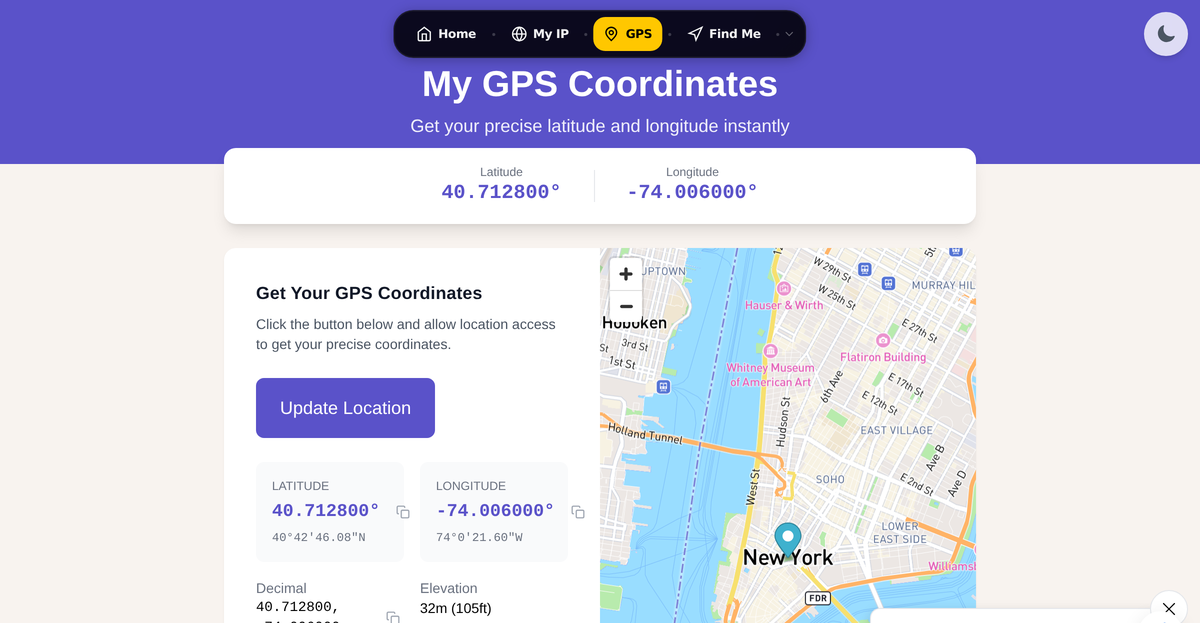
The Two Formats
Decimal Degrees (DD)
40.7128, -74.0060This is the default for Google Maps, Apple Maps, most GPS apps, and any programming or database work. A positive latitude is North; a negative latitude is South. A positive longitude is East; a negative longitude is West.
Key characteristics:
- Sign replaces the cardinal letter (negative = South or West)
- Typically 4-6 decimal places
- Easy for computers to calculate with
- Used by WGS84, the GPS standard
Degrees, Minutes, Seconds (DMS)
40° 42' 46.08" N, 74° 0' 21.6" WThis traditional format breaks each degree into 60 minutes and each minute into 60 seconds, the same way a clock divides an hour. It appears on paper topographic maps, aviation charts, and survey documents.
Key characteristics:
- Uses ° for degrees, ' for minutes, " for seconds
- Always includes a cardinal direction letter (N, S, E, W)
- One arcsecond of latitude is roughly 31 meters on the ground
- Navigation instruments and surveying software often default to this
Note: Aviation and marine GPS receivers frequently use a related format called Degrees Decimal Minutes (DDM), which looks like 40° 42.768' N. The NMEA standard, used by most marine electronics, uses DDM rather than full DMS. If you need to feed a chartplotter or aviation unit, check its manual for which sub-format it expects.
Quick Comparison
| Feature | Decimal Degrees | DMS |
|---|---|---|
| Example | 40.7128, -74.0060 | 40° 42' 46" N, 74° 0' 22" W |
| Best for | Digital apps, code, databases | Paper maps, surveying, aviation charts |
| Direction | + or - sign | N/S/E/W letter |
| Precision | 6 decimal places: ~11 cm | 1 arcsecond: ~31 m |
| Mental math | Add/subtract directly | Requires sexagesimal conversion |
Converting DMS to Decimal Degrees
Formula:
DD = Degrees + (Minutes / 60) + (Seconds / 3600)Example: Convert 40° 42' 46.08" N to decimal degrees
- Start with degrees:
40 - Divide minutes by 60:
42 / 60 = 0.7 - Divide seconds by 3600:
46.08 / 3600 = 0.0128 - Sum them:
40 + 0.7 + 0.0128 = 40.7128
Because it is North latitude, the result is positive. For South latitude or West longitude, negate the result.
Converting Decimal Degrees to DMS
Example: Convert 40.7128 to DMS
- The whole number is degrees: 40°
- Take the decimal and multiply by 60:
0.7128 × 60 = 42.768 - The whole number is minutes: 42'
- Take the remaining decimal and multiply by 60:
0.768 × 60 = 46.08 - That result is seconds: 46.08"
Final answer: 40° 42' 46.08" N
This round-trips cleanly: plugging 40° 42' 46.08" back into the DMS-to-DD formula returns exactly 40.7128. If you start with a truncated value like 46" (dropping the .08), you get 40.71278, which rounds to 40.7128 at four decimal places but will not reverse perfectly at higher precision. My rule: always carry seconds to at least two decimal places when converting so nothing gets lost.
Use the Coordinate Converter to handle both directions automatically, including batch conversions and UTM output.
Precision: How Many Decimal Places Do You Need?
One degree of latitude spans approximately 111 km at the equator. Each additional decimal place divides that by ten.
| Decimal Places | Approx. Ground Distance | Practical Use |
|---|---|---|
| 0 (40°) | ~111 km | Country level |
| 1 (40.7°) | ~11 km | City level |
| 2 (40.71°) | ~1.1 km | Neighborhood |
| 3 (40.713°) | ~111 m | Street level |
| 4 (40.7128°) | ~11 m | Building |
| 5 (40.71280°) | ~1.1 m | Very precise |
| 6 (40.712800°) | ~11 cm | Survey quality |
Commercial GPS receivers typically achieve 3-5 meter real-world accuracy, so expressing more than five or six decimal places rarely reflects genuine precision. For most everyday purposes, four decimal places is enough. See our complete GPS accuracy guide for a deeper look at what limits real-world accuracy.
In DMS, each full arcsecond is roughly 31 meters. Surveyors and some aviation documents use fractional seconds (like 46.08") to get to sub-meter resolution.
Which Format to Use
Use Decimal Degrees when:
- Pasting into Google Maps, Apple Maps, or any mapping app
- Writing code, working with databases, or using GIS software
- Sharing a coordinate digitally
- Calculating distances or doing any arithmetic on coordinates
Use DMS when:
- Reading or publishing paper topographic or nautical charts
- Working with surveying instruments or documentation
- Following aviation sectional charts that show DMS notation
- Matching a historical or scientific record that uses DMS
Our GPS Coordinates tool shows your current position in both formats at once, so you can copy whichever you need without conversion.
Common Mistakes to Avoid
Mixing up latitude and longitude order
Latitude is always listed first. An easy way to remember: Lat (latitude) comes before Long (longitude) alphabetically, and the number that changes when you move north or south is latitude.
Getting the sign wrong for West and South
- West of the Prime Meridian: longitude is negative
- South of the equator: latitude is negative
So New York City (40.7128° N, 74.0060° W) becomes 40.7128, -74.0060 in decimal degrees. Sydney, Australia, which is south and east, is -33.8688, 151.2093.
Treating 42.768 minutes as 42 minutes and 76.8 seconds
40° 42.768' is Degrees Decimal Minutes, not DMS. To reach DMS you must multiply the decimal minutes by 60: 0.768 × 60 = 46.08 seconds. Skipping this step and entering 42' 76.8" is invalid because seconds must stay below 60.
Using a comma as a decimal separator
Some locales write 40,7128 where English usage would write 40.7128. GPS fields and most mapping tools expect a period as the decimal point; a comma will either cause an error or be misread as the separator between latitude and longitude.
For more on entering coordinates in mapping apps, see how to enter coordinates into Google Maps.
Common Questions
What is the difference between decimal degrees and degrees minutes seconds?
Both formats describe the same point on Earth. Decimal degrees express the full coordinate as a single number with a decimal fraction (like 40.7128). Degrees minutes seconds break that fraction into two extra layers borrowed from timekeeping: 60 minutes per degree, and 60 seconds per minute. DMS is more intuitive on paper; decimal degrees are far easier for software to handle.
How do I convert DMS to decimal degrees by hand?
Divide the minutes by 60 and the seconds by 3600, then add both to the whole degrees. For example, 52° 30' 18" becomes 52 + (30/60) + (18/3600) = 52 + 0.5 + 0.005 = 52.505. If the coordinate is South or West, apply a negative sign to the final result.
How accurate is a GPS coordinate with 4 decimal places?
At the equator, one unit in the fourth decimal place equals roughly 11 meters. So a coordinate like 51.5074 could describe any point within about an 11-meter radius of the actual location. That is adequate for navigating to a building but not for finding a specific door. See our IP geolocation accuracy guide for context on how accuracy degrades further when location comes from an IP address rather than GPS.
Does Google Maps accept DMS coordinates?
Yes. You can paste a DMS coordinate like 40°42'46"N 74°0'22"W directly into the Google Maps search bar and it will recognize the format. You can also paste decimal degrees like 40.7128, -74.0060. Both work in the search field. For a full walkthrough, see how to enter coordinates into Google Maps or the how to find latitude and longitude guide.
Sources

WhatIsMyLocation Team
Our team of network engineers and web developers builds and maintains 25+ free networking and location tools used by thousands of users every month. Every article is reviewed for technical accuracy using real-world testing with our own tools.
Related Articles
Try Our Location Tools
Find your IP address, GPS coordinates, and more with our free tools.