
Summarise this article with:
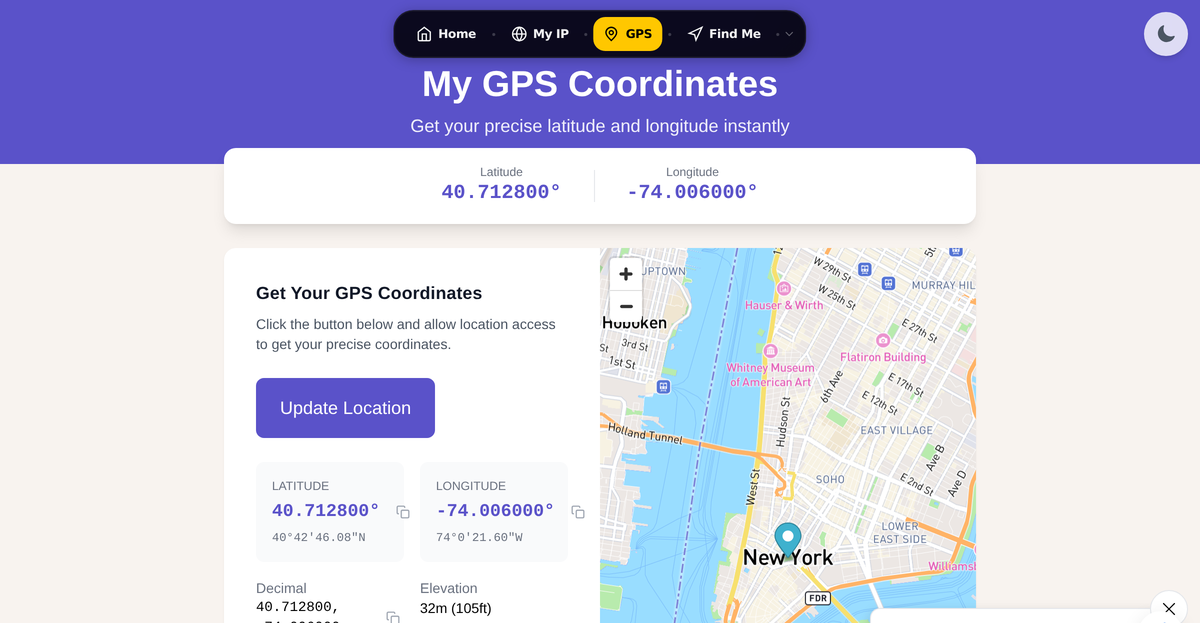
To find your latitude and longitude, right-click your location in Google Maps on a computer and the coordinates appear at the top of the pop-up in decimal format, like 40.712776, -74.005974. On a phone, your iPhone's Compass app shows live coordinates at the bottom of the screen, and dropping a pin in Google Maps or Apple Maps does the same. If you just want a clean read of where your browser thinks you are, our GPS Coordinates tool shows both formats in one click.
That is the short answer. Below I walk through five methods I actually use, which one to pick for your situation, how the formats differ, and how many decimal places you genuinely need (most guides over-share). I have spent years building location tools, so I will also flag the parts where these apps quietly disagree with each other.
TL;DR
- Fastest on a computer: right-click in Google Maps, read the coordinates at the top of the menu, click them to copy.
- Where you physically are standing: open the iPhone Compass app (coordinates sit at the bottom) or drop a pin in Apple Maps / Google Maps on the phone.
- In any browser, no app: our GPS Coordinates page reads your device location and shows decimal and DMS together.
- Latitude always comes first, then longitude. North and East are positive, South and West are negative.
- Five decimal places is enough for navigation and delivery. More than six is surveyor territory.
What latitude and longitude actually are
Two numbers pin any point on Earth. Latitude is your north-south position and runs from -90 degrees at the South Pole to +90 degrees at the North Pole, with the equator at 0. Longitude is your east-west position and runs from -180 to +180 degrees, with 0 at the Prime Meridian through Greenwich, London.
A worked example you can sanity-check against any map: New York City sits at roughly 40.7128, -74.0060. The first number is positive, so it is north of the equator. The second is negative, so it is west of Greenwich. That is the whole logic: the sign tells you which hemisphere, the number tells you how far.
| Term | Range | Positive means | Negative means |
|---|---|---|---|
| Latitude | -90 to +90 | North of equator | South of equator |
| Longitude | -180 to +180 | East of Greenwich | West of Greenwich |
The order trips people up constantly: it is latitude, then longitude, every time. Google Maps, Apple Maps, and GPS units all expect that order. Swap them and you can land in the ocean.
Method 1: Google Maps on a computer (most universal)
This is the method that works for any place on Earth, not just where you are standing, which is why I reach for it first when I need coordinates for an address I am not at.
- Open Google Maps in a browser.
- Search for the address, or pan and zoom to the exact spot.
- Right-click directly on the point you want.
- The latitude and longitude appear at the top of the pop-up menu in decimal format.
- Click the coordinates to copy them to your clipboard.
For pinpoint work, switch to satellite view first so you can right-click the actual roof or doorway instead of the middle of a parcel. Google confirms this right-click behavior in its own Maps help, and the displayed format is decimal degrees such as 40.712776, -74.005974.
Method 2: Google Maps on Android and iPhone
On a phone, the trick is to drop a pin on an unlabeled patch of map.
Android:
- Open the Google Maps app.
- Search for the address, or press and hold an unlabeled spot to drop a pin.
- Swipe up on the place card at the bottom.
- The coordinates are listed in the details.
iPhone (Google Maps app):
- Open Google Maps.
- Touch and hold an unlabeled area to drop a red pin.
- Tap the dropped-pin card at the bottom.
- The latitude and longitude show in the card, ready to copy.
The catch is that holding on a labeled business or landmark opens that place instead of dropping a raw pin, so you get the listing, not coordinates. Hold on blank map, not on a label.
Method 3: iPhone Compass app (no Maps needed)
If you want the coordinates of exactly where you are standing, the built-in Compass app is the quickest path and needs no internet once GPS has a fix.
- Open the Compass app.
- Your latitude, longitude, and elevation appear at the bottom of the screen.
- Tap the coordinates to open that point in Maps.
If the coordinates are blank, location access is off. Go to Settings > Privacy & Security > Location Services, turn it on, tap Compass, and choose While Using the App. For a tighter fix, make sure Precise Location is enabled for Compass too. Apple documents this in its Compass support guide, and it also warns that the digital compass can be thrown off by magnetic interference, so treat it as a quick read, not survey-grade. If your readings drift, see our guide on calibrating your phone compass and GPS.
Method 4: Apple Maps dropped pin
Apple Maps hides coordinates a little more than Google does, but they are there.
- Open Maps on your iPhone.
- Touch and hold the map until a pin drops.
- Tap the place card, then swipe up to the Coordinates row.
- Touch and hold the coordinates, then tap Copy.
To go the other way and find a point from coordinates someone sent you, tap the Apple Maps search bar and paste them in decimal format separated by a comma, like 40.730610, -73.935242. Apple's pin guide covers the drop-pin step.
Method 5: Our GPS Coordinates tool (fastest in a browser)
When I am at a desktop with no Maps tab open, the quickest read is the browser's own location API. Open our GPS Coordinates page, allow location access when prompted, and your latitude and longitude appear instantly in both decimal and DMS at once, with a copy button. It is the same browser geolocation that powers Google's "your location" blue dot, so accuracy depends on your hardware: a phone with GPS gets within a few meters, while a desktop using Wi-Fi positioning is usually within tens of meters.
I am not going to pretend this beats Google Maps for finding a remote address, because it only reads where your device is. For "where am I right now," it is the fewest clicks. For "where is that other place," use Google Maps. That honesty matters more than a sales pitch.
Which method should you use?
| Your situation | Best method | Why |
|---|---|---|
| Coordinates for an address you are not at | Google Maps on computer | Right-click any point on Earth |
| Where you are standing, fast | iPhone Compass | Live coordinates, no Maps app |
| Already navigating in Apple Maps | Apple Maps dropped pin | Coordinates in the place card |
| Any browser, one click | Our GPS Coordinates tool | Reads device location, shows both formats |
| Converting a format you were given | Our Coordinate Converter | DD, DMS, and UTM in one place |
Coordinate formats: DD, DMS, and Plus Codes
The same point can be written several ways, which is why a number that looks "wrong" is often just a different format.
Decimal Degrees (DD), the default
40.7128, -74.0060This is what phones, apps, and most websites use. Positive is North or East, negative is South or West. It is the format I recommend for sharing because it pastes cleanly into any map.
Degrees, Minutes, Seconds (DMS), the traditional one
40° 42' 46" N, 74° 0' 22" WCommon in aviation, maritime charts, and older paper maps. To convert DMS to decimal, divide minutes by 60 and seconds by 3600, then add:
DD = Degrees + (Minutes / 60) + (Seconds / 3600)So 40° 42' 46" N becomes 40 + (42 / 60) + (46 / 3600), which is about 40.7128. Our Coordinate Converter does this both ways, and also handles UTM, so you never have to do the arithmetic by hand. For a deeper comparison, see Decimal Degrees vs DMS explained.
Plus Codes and what3words, the word-and-letter addresses
Two newer systems turn a location into something easier to say out loud:
- Plus Codes (Open Location Code) are Google's free, open-source grid system. A full code like
87G8Q23M+9Xresolves to roughly a 14 by 14 meter square, with one extra character tightening it to about 3.5 by 2.8 meters. Because it is open source, anyone can use or build on it for free. - what3words is a proprietary system that names every 3 by 3 meter square on Earth with three dictionary words, for example
///filled.count.soap. The app is free to use, but the underlying word grid is owned by the company, not open. It is genuinely handy for telling a friend exactly where to meet, but it is not a public standard the way Plus Codes are.
Plain coordinates remain the universal format that every map and GPS unit accepts. Plus Codes and what3words are conveniences layered on top, not replacements.
How accurate are these coordinates, and how many decimals do you need?
Two different questions hide here: how accurate your device is, and how much precision the format can hold. They are not the same.
On the device side, the U.S. government's GPS.gov states that GPS-enabled smartphones are typically accurate to within a 4.9 meter (16 ft) radius under open sky. That degrades near tall buildings, bridges, and dense trees, where signals bounce. Desktops without GPS fall back to Wi-Fi and IP positioning and can be off by tens of meters or more, which is a different problem entirely. If your location is wildly wrong rather than just imprecise, that is usually IP-based, and our piece on GPS vs IP location explains why.
On the format side, every decimal place you add multiplies precision by ten. The table below uses figures from the OpenStreetMap precision reference and Wikipedia's decimal degrees article, measured at the equator:
| Decimal places | Precision at equator | Good for |
|---|---|---|
| 2 | About 1.1 km | A neighborhood, privacy-friendly sharing |
| 3 | About 110 m | A village or city block |
| 4 | About 11.1 m | A specific building or parcel |
| 5 | About 1.1 m | A doorway, most navigation and delivery |
| 6 | About 0.11 m (11 cm) | Surveying and precise GIS |
For everyday use, five decimal places is the sweet spot. It pins you to about a meter, which is finer than your phone's GPS is anyway, so extra digits just add noise. If you are sharing your location publicly and want some privacy, rounding to two or three decimals deliberately blurs you to a block or neighborhood.
Common reasons people need their coordinates
- Emergency calls: if your address is unclear or you are off-road, exact coordinates help. On iPhone, calling 911 in the US can already share your location automatically through Apple's HELO system and RapidSOS, per Apple's announcement. Our emergency location guide covers manual sharing too.
- Deliveries to rural or unmarked addresses: drivers find a pin faster than a vague description.
- Drone flight: many rules reference distance from coordinates or controlled-airspace boundaries.
- Geocaching, surveys, and weather stations: all want a precise point.
- Measuring distance: once you have two sets of coordinates, our Distance Calculator gives the straight-line distance between them.
A privacy note before you share
Your exact home coordinates reveal where you live as precisely as a street address, sometimes more. Only share full-precision coordinates with people or services that genuinely need them. If you are posting publicly or sending to someone you do not fully trust, round to two or three decimal places, which still points to the right area without exposing your front door. Coordinates do not expire or get revoked the way a shared link can, so treat them as permanent.
My take in one sentence
For finding the coordinates of any place on a computer, right-clicking in Google Maps is unbeatable, but for reading where you physically are, the iPhone Compass app or our GPS Coordinates tool gets you there in fewer taps, and five decimal places is all the precision you will ever need.
Frequently Asked Questions
Does latitude or longitude come first?
Latitude always comes first, then longitude. Maps and GPS units expect the order lat, long, for example 40.7128, -74.0060 for New York City. Reversing them can place you in a completely different part of the world, often the ocean.
What do the negative signs in coordinates mean?
The sign tells you the hemisphere. Positive latitude is North of the equator, negative is South. Positive longitude is East of the Greenwich Prime Meridian, negative is West. Most of the Americas have positive latitude and negative longitude.
How accurate is the latitude and longitude from my phone?
According to GPS.gov, a smartphone with GPS is typically accurate to within about 4.9 meters under open sky. Accuracy drops near tall buildings, under bridges, or in dense forest because the signal reflects or gets blocked. Stepping into open sky and giving it a few seconds to lock improves the fix.
How many decimal places should I use for coordinates?
Five decimal places give roughly one meter of precision at the equator, which is finer than consumer GPS, so it is enough for navigation, delivery, and emergencies. Six places reach about 11 centimeters and are only needed for surveying. For privacy when sharing publicly, two or three places deliberately blur you to a neighborhood.
How do I convert DMS coordinates to decimal degrees?
Add the degrees, the minutes divided by 60, and the seconds divided by 3600. For 40° 42' 46" N, that is 40 + 42/60 + 46/3600, which equals about 40.7128. Our Coordinate Converter does this automatically in both directions and also handles UTM.
Can I find coordinates without any app?
Yes. On a computer, right-click in Google Maps in your browser, or open our GPS Coordinates page and allow location access. The browser's built-in geolocation reads your device position and shows the latitude and longitude with no app to install.
What is the difference between Plus Codes and what3words?
Plus Codes (Open Location Code) are Google's free, open-source grid system that turns a point into a short code anyone can use or build on. what3words is a proprietary system that names each 3-meter square with three words; the app is free but the word grid is owned by the company. Plain coordinates remain the universal format every map accepts.
Why does my desktop show a less accurate location than my phone?
Desktops usually lack a GPS chip and fall back to Wi-Fi and IP-based positioning, which is accurate to tens of meters at best and sometimes points to the wrong city entirely. Phones use real GPS satellites for a few-meter fix. If your location looks wildly wrong, it is almost always IP-based positioning, not a broken GPS.
WhatIsMyLocation Team
Our team of network engineers and web developers builds and maintains 25+ free networking and location tools used by thousands of users every month. Every article is reviewed for technical accuracy using real-world testing with our own tools.
Related Articles
Try Our Location Tools
Find your IP address, GPS coordinates, and more with our free tools.