
Summarise this article with:
Why They Differ
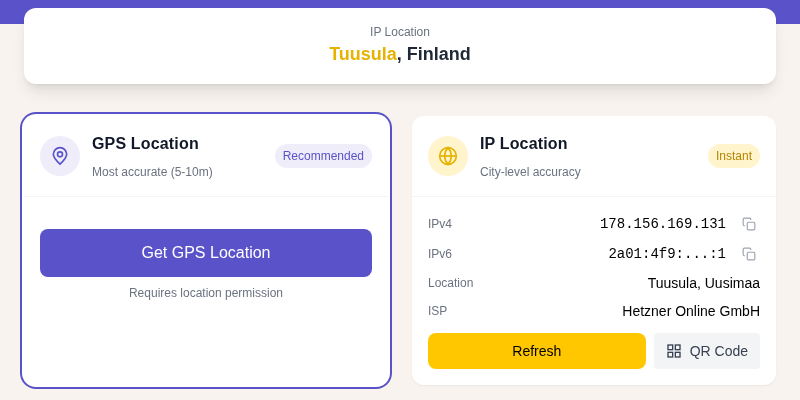
Your phone fuses GPS, WiFi, and cell signals simultaneously; your laptop almost never has a GPS chip, so it relies on WiFi positioning or falls back to IP geolocation. The result is a gap of 3 meters vs. hundreds of meters for the same location request. This is a hardware difference, not a software one.
What Each Device Class Can Actually See
The table below shows which signals are available per device. Accuracy figures come from GPS.gov (GNSS), research literature on WiFi WPS, and MaxMind's published IP geolocation data.
Smartphone
| Signal | Typical accuracy | Notes |
|---|---|---|
| GPS / GNSS (GPS, GLONASS, Galileo, BeiDou) | 3-5 m open sky; flagship phones under 3 m | Requires clear sky view; degrades indoors |
| WiFi positioning (WPS) | 5-20 m | Uses nearby access-point MAC addresses matched to Google/Apple databases |
| Cell tower triangulation | 150 m urban, 2-5 km rural | Falls back when GPS and WiFi fail |
| Bluetooth beacons | 1-5 m | Only in venues that have deployed beacons |
A phone fuses all available signals in real time through its OS location service. GPS gives the baseline; WiFi positioning fills gaps indoors; cell towers catch the rest.
Laptop / MacBook
| Signal | Typical accuracy | Notes |
|---|---|---|
| WiFi positioning (WPS) | 5-20 m, sometimes 50-75 m | Depends on how many nearby APs are in Google/Apple databases |
| IP geolocation | 10-50 km | ISP routing, not physical address |
Most laptops have no GPS receiver. If the WiFi card is on, the OS can scan nearby access points and look them up in the same WPS databases that phones use. When that works well (dense city center, many mapped APs), accuracy can reach 50-75 m. When it fails (rural area, unmapped APs), the browser falls back to IP-based location: city-level only.
Desktop PC
A wired desktop with no WiFi card gets only IP geolocation, which resolves to your ISP's routing region. That could be your city or a city your ISP uses as a regional hub. If the desktop has a WiFi card, it can use WPS with the same accuracy as a laptop.
How the Browser API Works
When any website calls navigator.geolocation.getCurrentPosition(), the browser asks your OS for a position fix. The browser itself does not determine location; it just passes through whatever the OS provides.
The OS returns coordinates plus an accuracy radius in meters. On a phone with GPS, that radius might be 8 m. On a laptop using WPS, it might be 500-1500 m. On a desktop falling back to IP, it could be 5-50 km. Websites that display your location see this accuracy value and can decide whether it is precise enough for their purpose.
Permission prompts work identically on both device types. The difference is entirely in what the hardware delivers after permission is granted.
You can check what accuracy your current device and browser report at Find My Location.
When Laptop Location Catches Up
Desktop accuracy improves in specific situations:
- Dense city center on a well-mapped WiFi network. Google and Apple crowd-source access-point positions every time a GPS-equipped phone passes near a router. If many phones have walked by your office building, the WPS database is accurate. In my testing, a MacBook on a busy city-block WiFi returned a position within about 60 m of my actual location, while a home router on a quiet street landed me 800 m off.
- Business laptops with WWAN modems. Some ThinkPads, Surface Pro with LTE, and other devices include a cellular modem with GPS. Check Device Manager (Windows) or System Information (Mac) to see if yours does.
- USB GPS receiver. A $30-60 USB dongle provides GNSS accuracy equivalent to a phone. Rare, but useful if you need consistent desktop location for development or mapping work.
- Phone hotspot or USB tether. When a laptop connects through a phone's hotspot, some operating systems pull the phone's GPS fix into the laptop's location service.
Why IP Geolocation Alone Falls Short
IP geolocation maps your IP address to a physical location using databases built from ISP routing records. This is accurate for country (nearly always correct) and approximate for city. For a detailed look at the error ranges involved, see why your IP location shows the wrong city.
The mismatch is especially common on mobile networks. Cellular carriers route data through regional hubs, so your mobile IP may resolve to a city 100+ km from where you actually are. See IP geolocation accuracy for more on this.
Privacy Trade-off
Higher accuracy creates more surveillance surface. A phone's meter-level GPS fix can reveal where you sleep, where you work, and which stores you visit. Desktop WiFi positioning at 50-800 m is too coarse for that kind of profiling, which is an incidental privacy benefit of having less hardware.
For mobile, all major OSes now support granular permission levels:
- Always allow (runs in background)
- Allow while app is open
- Allow once
- Approximate location (iOS 14+, Android 12+): returns a location accurate to 1-20 km, enough for weather but not for navigation or physical tracking
The approximate-location option is worth using by default for most apps. Only grant precise location to apps that need it (navigation, ride-share, food delivery).
See GPS vs IP location: the full difference explained for more on how these signals interact.
FAQ
Does my laptop have GPS?
Almost certainly not, unless you have a business laptop with a WWAN modem (common in ThinkPad X1 Carbon LTE or Surface Pro LTE editions). To check on Windows, open Device Manager and look under Sensors or Network Adapters for anything labelled GNSS or GPS. On Mac, open System Information and check the Hardware section.
Why does my desktop browser sometimes show a very accurate location?
You are probably on a WiFi network that is well-represented in Google's or Apple's WPS database. Every GPS-equipped phone that passes your router uploads its approximate coordinates. Dense urban areas have extremely well-populated databases, so even a laptop or desktop with no GPS can get a fix within 50-100 m. If the fix looks suspiciously good, this is why.
Can a website find my location without me clicking Allow?
It can estimate your country and rough city from your IP address without any permission at all. Getting a GPS or WiFi fix requires the browser to ask you and for you to click Allow. No bypass exists through the standard web APIs; that permission gate is enforced by the OS, not the website.
Does using a VPN affect geolocation differently on mobile vs. desktop?
On desktop, where the fallback is IP geolocation, a VPN moves your apparent location to the VPN server's city. On mobile with GPS active, a VPN changes your IP location but GPS is independent of the network. So a phone with GPS on shows your real position even through a VPN, while a desktop through the same VPN shows the VPN server's city. See is my VPN working? for how to confirm which signal your browser is using.
Sources

WhatIsMyLocation Team
Our team of network engineers and web developers builds and maintains 25+ free networking and location tools used by thousands of users every month. Every article is reviewed for technical accuracy using real-world testing with our own tools.
Related Articles
Try Our Location Tools
Find your IP address, GPS coordinates, and more with our free tools.