
Summarise this article with:
The Short Answer
No. Incognito mode does not hide your IP address or your location. Every website you visit in a private browsing window sees your real IP, your ISP sees every domain you connect to, and network administrators can watch your activity in real time. Private browsing is a local privacy tool that keeps your history off your device. It offers zero protection at the network level.
This confusion has real consequences. Google faced a $5 billion class action lawsuit over it and, as part of the 2024 settlement, updated Chrome's incognito disclaimer to explicitly state: "This won't change how data is collected by websites you visit and the services they use, including Google."
What Incognito Mode Actually Does
When you open an incognito, private, or InPrivate window, your browser makes one specific promise: it will not remember what you did after you close the window.
That means your browser:
- Does not save pages to your browsing history
- Deletes any cookies created during the session once you close the window
- Does not store form inputs or autofill data from the session
- Does not write site data or cached files from the session to disk
That is the whole list. Everything happens on your device only. Nothing changes about how your traffic looks to the outside world.
What Incognito Mode Does NOT Do
Your IP address is still visible to every site you visit
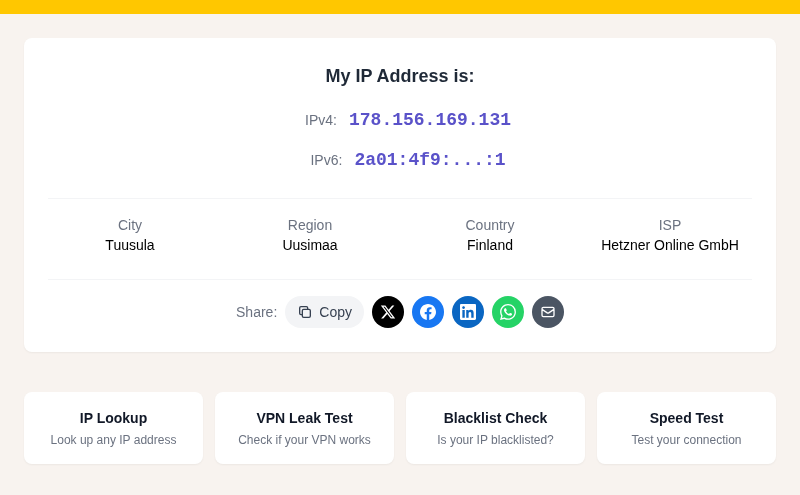
Your IP address travels with every request your browser makes. Websites, ad networks, and analytics platforms see it regardless of whether you are in a private window. Because your IP maps to an approximate location, sites can still geolocate you to roughly your city or metro area. Check your current IP and what it reveals at /my-ip.
Your ISP can see every domain you visit
Your Internet Service Provider routes all your traffic. Even on HTTPS sites, your ISP sees the domain names you connect to via DNS queries and connection metadata. Incognito mode does nothing to change this. In my testing with a packet capture tool, a private-mode session produces exactly the same DNS traffic as a normal window.
Network admins at work or school can track you
If you are on a corporate, school, or any managed network, the IT team can see which sites you visit. The monitoring happens at the network layer, not the browser layer. Incognito mode is invisible to that layer entirely.
Websites can still fingerprint your browser
Browser fingerprinting collects signals like your screen resolution, installed fonts, browser version, time zone, and hardware configuration to build a profile of your device. Incognito mode does not change any of these signals. Your browser reports the same fingerprint in a private window as in a normal one.
There is an ironic wrinkle: using incognito mode can actually make you more distinctive. Private windows typically block certain storage APIs, and fingerprinting scripts detect that blocked behavior. Being in the small fraction of users running incognito becomes a data point that narrows down who you are. You can test what sites see about your browser at /browser-fingerprint.
GPS-based location still works if you grant permission
If a site requests access to your precise location via the browser's Geolocation API and you allow it, incognito mode does not block that permission. In Chrome, permissions granted in a normal window can carry over into an incognito session. GPS coordinates remain fully readable if you say yes to the prompt.
Google Analytics and ad trackers still run
Google's own tracking products, including Analytics and Ads, continue collecting data during incognito sessions. The updated Chrome disclaimer now explicitly says this. Third-party ad networks embedded on pages see your IP and fingerprint the same as always.
When Incognito Mode Is Genuinely Useful
Private browsing is not pointless. It solves a specific, narrow problem: keeping your activity off the local device.
Good uses:
- Shopping for gifts on a shared computer without revealing what you are buying
- Borrowing someone's laptop without leaving your accounts signed in
- Logging into a second account on a service that only allows one session at a time
- Testing a web page as a logged-out visitor to see what anonymous users see
- Avoiding personalized search results when you want unfiltered results
Bad uses: hiding your location, hiding your IP, evading your ISP, or protecting yourself from tracking while on a work or school network.
What Actually Hides Your Location
If you want real network-level privacy, the tool needs to sit between your device and the internet, not inside your browser.
VPN
A VPN routes your traffic through a server in another location and substitutes that server's IP address for yours. Websites see the VPN's IP. Your ISP sees only that you are connected to a VPN, not which sites you visit. This is the most practical option for daily use. See how to hide your IP address for a full breakdown, and how to check whether your VPN is actually working.
One caveat: a VPN does not stop browser fingerprinting or GPS-based location if you grant a site that permission.
Tor Browser
Tor routes traffic through three encrypted relays operated by volunteers. This makes traffic analysis much harder and is the strongest widely available option for anonymity. The trade-off is speed: Tor is significantly slower than a normal connection.
DNS over HTTPS
Encrypting your DNS queries via DoH stops your ISP from reading your domain lookups. It does not hide your IP from websites, but it removes one layer of ISP visibility. Most major browsers now support it. Read more about DNS over HTTPS.
The Comparison at a Glance
| What you want to hide | Incognito mode | VPN | Tor |
|---|---|---|---|
| Browsing history on device | Yes | No | No |
| IP address from websites | No | Yes | Yes |
| Location from websites (IP-based) | No | Yes | Yes |
| Activity from your ISP | No | Yes | Yes |
| Browser fingerprint | No | No | Partially |
| GPS location (if you grant permission) | No | No | No |
Common Questions
Does incognito mode hide my location from Google Maps?
No. Google Maps sees your IP address regardless of incognito mode. If you grant the site permission to use your GPS location, it receives those coordinates too. To appear in a different location in Maps, you would need a VPN to change your IP and deny the GPS permission prompt. Even then, Google may retain contextual signals like your search history if you are signed into a Google account.
Can my employer see what I browse in incognito mode?
Yes. Incognito mode only affects your local browser. If your device is on a corporate network or managed by company IT, the network can log DNS queries and connection metadata. Many corporate environments also install monitoring software directly on work devices, which operates below the browser level entirely.
Does incognito prevent websites from knowing my city?
Not reliably. Your IP address maps to a location, typically within a few kilometers for a fixed broadband connection. Websites can run an IP geolocation lookup the moment your request arrives, in or out of incognito mode. See why IP location sometimes shows the wrong city for how that lookup works and where it can be off. For understanding the gap between IP-based and GPS-based location, see GPS vs IP location.
Does incognito mode hide your IP address from your WiFi router?
No. Your router handles all traffic that leaves your device. It sees every IP address your device connects to. Incognito mode is entirely invisible to the router. If you are on someone else's WiFi, that person could theoretically inspect their router logs and see every domain you visited, private window or not.
Sources
- Google Chrome incognito disclaimer update - 9to5Google
- Common Myths about Private Browsing - Mozilla Support
- Geolocation API - MDN Web Docs
- Does Incognito mode hide your IP address? - Surfshark
- Browser Fingerprinting and Privacy Guide 2026 - ipinfo.im
- ISP Tracking: What Your Internet Provider Can See - BroadbandNow

WhatIsMyLocation Team
Our team of network engineers and web developers builds and maintains 25+ free networking and location tools used by thousands of users every month. Every article is reviewed for technical accuracy using real-world testing with our own tools.
Related Articles
Try Our Location Tools
Find your IP address, GPS coordinates, and more with our free tools.