
Summarise this article with:
The Key Difference
IP tracking ties you to a network location. Browser fingerprinting ties you to a device and browser configuration. A VPN defeats the first method entirely and does nothing about the second. That asymmetry is why fingerprinting has become the tracking method of choice for ad networks that need cross-session identification.
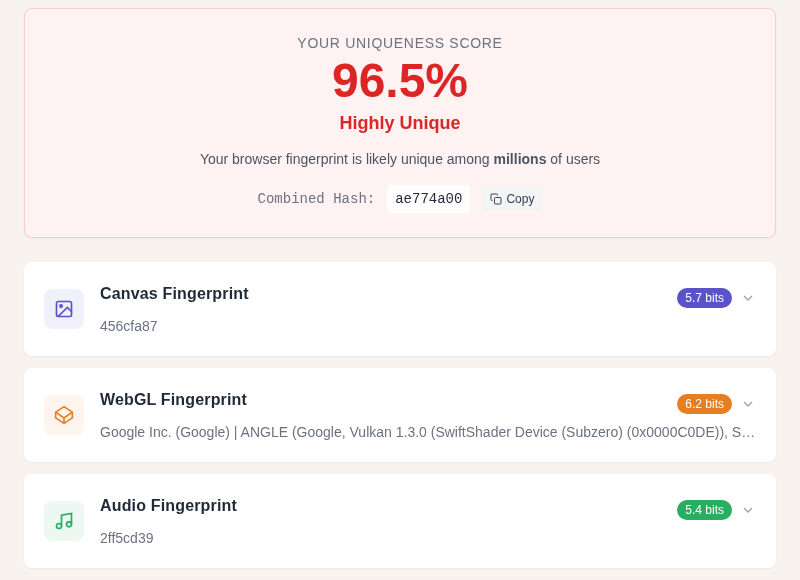
Both methods are active right now when you visit most commercial websites. Understanding how they differ in persistence, VPN-proofness, and mitigations is what lets you decide which defenses are actually worth the effort.
How IP Tracking Works
Every request your browser sends carries a source IP address. Servers log it. Trackers read it.
What IP tracking gets you as a tracker:
- Country and region (reliably)
- City-level estimate (often your ISP's regional hub, not your actual neighborhood)
- ISP name and connection type
- Cross-visit recognition if your IP stays stable
IP addresses are less stable than most people assume. Residential ISPs hand out dynamic IPs via DHCP, and your IP can change when your router reboots. That said, research has found that 87% of residential users retained at least one IP address for more than 30 days when their router stayed online continuously. So for most home users, an IP is a semi-persistent identifier, not a daily-rotating one.
Mobile data is different: carrier-grade NAT means dozens of users share a single public IP, so it identifies almost nobody individually.
You can see what your current IP reveals at /my-ip, or look up any IP at /ip-lookup.
How Browser Fingerprinting Works
Your browser leaks dozens of attributes to every page it loads, via HTTP headers and JavaScript APIs. Common signals:
- User-agent string (browser version, OS)
- Screen resolution and color depth
- Timezone and system language
- Installed fonts (probed via JavaScript)
- Canvas fingerprint (how your GPU renders a specific test image)
- WebGL fingerprint (graphics card capabilities)
- Audio context fingerprint (subtle differences in audio processing)
- Hardware concurrency (CPU core count)
- Device memory (rough RAM estimate)
No single signal is identifying. Combined, they form a fingerprint that research from AmIUnique.org and the EFF's Cover Your Tracks project puts at roughly 83-90% unique across users when 13 or more signals are combined. That means most browsers are distinguishable from almost everyone else visiting the same site.
The key property is that this fingerprint is computed live from your hardware and software on every page load. No file is stored on your device. Clearing cookies, history, and cache does nothing to change it.
For a deeper look at how fingerprinting is constructed signal by signal, see Browser Fingerprinting Explained.
Side-by-Side Comparison
| Property | IP Tracking | Browser Fingerprinting |
|---|---|---|
| What it captures | Network exit point | Device + browser configuration |
| Persists across sessions? | Only if IP stays stable | Yes, unless browser or hardware changes |
| Defeated by VPN? | Yes | No |
| Defeated by incognito? | No | No |
| Defeated by clearing cookies? | No | No |
| Requires JavaScript? | No | Mostly yes (some via HTTP headers) |
| Changes when you update your browser? | No | Partially (user-agent, some rendering) |
| Accurate cross-site without consent? | Yes | Yes |
In my testing with Cover Your Tracks (coveryourtracks.eff.org), a stock Chrome install on a common laptop produces a result in the "unique or near-unique" range. Switching to a VPN doesn't change that result at all.
VPN Effect on Each Method
A VPN replaces your IP address with the VPN server's IP. For IP tracking, that is a complete solution: the site sees the exit node IP, not your real one, and your real IP is hidden.
For fingerprinting, a VPN changes nothing. Your canvas fingerprint, WebGL hash, audio fingerprint, timezone, and installed fonts are all the same through a VPN tunnel as without one. A tracker that collected your fingerprint before you enabled the VPN and after you enabled it can stitch both sessions together.
There is a secondary issue too: WebRTC. This browser API can expose your real local IP address even through a VPN, because WebRTC operates at the browser API layer, not the network routing layer. Brave blocks WebRTC leaks by default. Most other browsers do not. You can check your exposure at /vpn-leak-test and /dns-leak-test.
If you rely on a VPN for privacy, also read Is My VPN Actually Working? to verify nothing is leaking.
Persistence: Which Lasts Longer
Browser fingerprints are more persistent than IPs for most users.
Your IP changes when:
- Your router reboots (DHCP lease expires)
- You switch networks (home to office to mobile)
- You connect a VPN
Your fingerprint changes when:
- You update your browser (user-agent changes, sometimes rendering engine behavior changes)
- You upgrade your hardware (new GPU changes canvas and WebGL output)
- You change your display configuration (resolution, scaling)
- You add or remove fonts or browser extensions
For a typical user who keeps a laptop for 2-3 years and updates Chrome automatically, the fingerprint is stable for months or years at a stretch. The IP fluctuates weekly.
Mitigation Per Vector
Defeating IP tracking
- VPN: Replaces your IP with the exit node's. Complete for IP-level identification. Check for leaks after connecting.
- Tor: Routes traffic through three hops, hides your real IP more thoroughly than a VPN.
- Mobile data: Carrier NAT provides natural obscuration, though it doesn't protect you from fingerprinting.
Defeating browser fingerprinting
This is harder. Options, in order of effectiveness:
Brave browser uses "farbling" - it generates a per-session, per-site seed and uses it to return slightly randomized values from canvas, WebGL, and audio APIs. The randomization is imperceptible to users but defeats cross-session and cross-site fingerprint correlation. This is currently the most practical defense for everyday browsing.
Firefox with fingerprint protection enabled takes a standardization approach, reporting normalized values for screen resolution, CPU cores, and touch inputs, and adding noise to canvas reads. Mozilla reports this reduces the uniquely fingerprinted user population significantly compared to default settings.
Tor Browser standardizes fingerprints across all users: it uses letterboxing (window size rounded to 200px x 100px increments), blocks canvas extraction, limits fonts, and normalizes user-agent strings. The goal is to make every Tor user look identical to trackers, not just different each session.
uBlock Origin blocks many third-party tracking scripts, so fingerprinting scripts from ad networks never run. It does not manipulate or randomize API outputs directly. It is necessary but not sufficient on its own.
| Defense | Defeats IP tracking | Defeats fingerprinting |
|---|---|---|
| VPN | Yes | No |
| Tor Browser | Yes | Largely (by standardizing the fingerprint) |
| Incognito / private mode | No | No |
| uBlock Origin | No | Partially (blocks tracking scripts) |
| Brave browser | Partial (no WebRTC leak by default) | Yes (per-session randomization) |
| Firefox fingerprint protection | No | Yes (significant) |
| Disabling JavaScript | No | Largely yes (most vectors need JS) |
Practical stack for most users
- Brave (or Firefox with fingerprint protection on) handles the fingerprint side
- uBlock Origin reduces the scripts that collect signals
- VPN handles the IP side and obscures ISP-level metadata
That three-way combination is what I use for everyday browsing where privacy matters. For high-stakes use cases (whistleblowing, legal research, targeted harassment situations), Tor Browser is the correct choice because it addresses both vectors simultaneously.
What Modern Ad Tech Combines
Neither IP nor fingerprint alone is how sophisticated trackers actually operate. The ad industry calls the full stack "ID resolution": IP plus fingerprint plus cookies plus logged-in account identity plus cross-site referrer data. Each signal is one input into a probabilistic match that assigns a persistent user ID even when individual signals change.
This is worth naming because it explains why defeating one vector does not make you invisible. A VPN user on Chrome with third-party cookies enabled is still trackable through fingerprint and cookies. A Brave user without a VPN is still identifiable by IP. The combination of defenses is what matters, not any single one.
For more on how IP information gets combined with other data, see What Can Someone Do With Your IP Address and What Information Websites Collect From Your IP.
Legitimate Uses of Both Methods
Banks and fraud prevention teams use fingerprinting to flag when an account is accessed from a device that has never been seen before, triggering step-up authentication. That use of the same technology as ad trackers is protective. The line between protective and invasive depends on whether you knew, consented, and benefit from the detection.
IP-based blocking (geo-restrictions, rate limiting, abuse prevention) similarly uses tracking for purposes that often benefit users, even if the same data can be used invasively.
FAQ
Does a VPN protect me from browser fingerprinting?
No. A VPN routes your traffic through a different IP address, but your browser fingerprint, which is computed from your hardware, fonts, GPU, and browser configuration, stays identical. A tracker that has your fingerprint from a session without a VPN can match it to a session with a VPN running. For fingerprint protection, you need Brave, Firefox's fingerprint protection mode, or Tor Browser, not a VPN.
Is my browser fingerprint really unique enough to track me?
Likely yes if you are using a standard browser without fingerprint defenses. Research combining 13 or more signals puts the uniqueness rate at 83-90% of users. The EFF's Cover Your Tracks tool (coveryourtracks.eff.org) shows you how distinctive your specific browser looks. Most stock Chrome or Edge installs return results in the "unique or near-unique" range.
Does incognito mode hide my browser fingerprint?
No. Incognito (or private browsing) clears cookies and browsing history at the end of a session, but your browser fingerprint is computed live from your hardware and software on every page load. The canvas fingerprint, WebGL output, and audio fingerprint are the same in incognito as in a normal window. Fingerprinting works exactly the same in both modes.
Which is more dangerous for privacy: IP tracking or fingerprinting?
Fingerprinting is harder to defeat and more persistent. Your IP changes when you reboot your router, switch networks, or use a VPN. Your fingerprint stays stable for months unless you change hardware or upgrade your browser significantly. For cross-session and cross-site tracking without your involvement, fingerprinting is the more powerful tool. That said, both matter, and modern tracking systems combine them.
Sources
- https://brave.com/privacy-updates/3-fingerprint-randomization/
- https://support.torproject.org/tor-browser/features/fingerprinting-protections/
- https://support.mozilla.org/en-US/kb/resist-fingerprinting
- https://github.com/gorhill/uBlock/wiki/Does-uBO-protect-against-fingerprinting%3F
- https://residentialip.net/how-often-do-residential-ip-addresses-change/
- https://arxiv.org/pdf/2403.15607

WhatIsMyLocation Team
Our team of network engineers and web developers builds and maintains 25+ free networking and location tools used by thousands of users every month. Every article is reviewed for technical accuracy using real-world testing with our own tools.
Related Articles
Try Our Location Tools
Find your IP address, GPS coordinates, and more with our free tools.