Summarise this article with:
The Short Version
Your browser leaks a unique combination of hardware and software details every time you load a page, and clearing cookies does nothing to change that. Browser fingerprinting collects those details, hashes them into an identifier, and uses it to track you across sites without storing anything on your device. The EFF's Panopticlick research found that roughly 84% of browsers carry a unique fingerprint even among samples of hundreds of thousands of visitors.
Run our Browser Fingerprint tool right now and you will see exactly what data your browser is currently broadcasting.
What Our Fingerprint Tool Actually Shows You
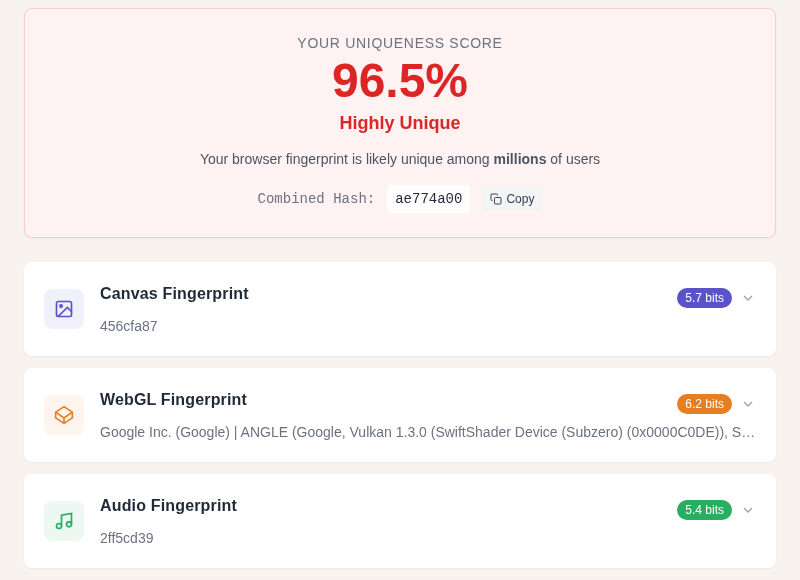
When you open the Browser Fingerprint tool, the results page breaks your exposure into categories. Here is what each one means and why it matters.
User Agent String
This is the first thing any web server sees. It contains your browser name, version number, and operating system in a single string. Most users share common user agents, so this signal alone is not very unique, but it anchors the rest of your profile. You can inspect yours in detail with the dedicated User Agent tool.
Learn more about exactly how these strings are structured in User Agent Strings Explained.
Canvas Fingerprint Hash
This is usually the most distinctive signal in your results. The tool asks your browser to draw a short block of text and geometric shapes on an invisible canvas element, then reads back the raw pixel data and hashes it. The rendering is determined by your GPU, GPU driver version, operating system font renderer, and anti-aliasing settings. Two machines running the same browser and OS can still produce a different canvas hash because their GPU or driver version differs.
The hash itself is short, but because hardware combinations vary so widely, this one signal has a high probability of being unique to your setup.
WebGL Renderer and Vendor
The tool queries your browser for the renderer string your GPU reports, such as "NVIDIA GeForce RTX 4080" or "Apple M3." It also reads the list of supported WebGL extensions and maximum texture sizes. Because this information comes directly from your graphics hardware, it is highly stable and hard to fake without breaking graphical rendering entirely.
Installed Fonts
The tool measures which fonts your browser can render by drawing text in hundreds of font families and checking whether each one falls back to a default. The result depends on your OS, the apps you have installed (Adobe apps add dozens of fonts), and any fonts you have manually installed. In my testing, two machines with the same browser and OS version still differ noticeably here once any creative software has been installed on one of them.
The Panopticlick experiment identified fonts as one of the highest-entropy single signals, contributing approximately 13.9 bits of identifying information in Eckersley's 2010 dataset.
Screen and Display Details
Resolution, color depth, device pixel ratio, and available screen area after the taskbar are all reported. Common resolutions like 1920x1080 are shared by millions of users, so this signal alone is weak. A high-DPI 4K display at an unusual resolution narrows the pool considerably.
Hardware Details
CPU core count (hardware concurrency) and approximate device memory are readable via JavaScript. These are not high-entropy signals on their own, but they help distinguish a laptop from a server or an old phone from a new desktop.
WebRTC Status
This shows whether your real local IP and public IP are leaking through WebRTC, even if you are using a VPN. WebRTC is a browser API for peer-to-peer connections; it can negotiate your actual IP address past an active VPN tunnel. If this section shows your real IP, use the VPN Leak Test immediately and consult your VPN's WebRTC blocking settings.
Why This Combination Is So Hard to Change
Each signal above is mostly harmless in isolation. The problem is combination. Eckersley's foundational research found that the complete browser fingerprint carries at least 18.1 bits of identifying entropy, meaning that at best only one in roughly 286,000 browsers shares the same fingerprint as yours. With JavaScript enabled, that uniqueness is even higher.
Unlike a cookie, there is nothing on your device to delete. The fingerprint is recalculated fresh from your system on every page load.
| Property | Cookies | Browser Fingerprint |
|---|---|---|
| Stored on your device | Yes | No |
| Survives cookie clearing | No | Yes |
| Works in incognito mode | Blocked/isolated | Yes |
| User can delete it | Yes | No |
| Requires server storage | No | Yes |
| Cross-browser tracking | Same browser only | Sometimes |
The Four Main Fingerprinting Techniques
Canvas Fingerprinting
The browser draws a hidden image via the HTML5 Canvas API, including text with specific fonts and shapes with gradients and transparency. The exact pixel output varies by GPU, driver, and font renderer. A hash of those pixels becomes the canvas fingerprint. This is the most widely deployed technique because it takes just a few lines of JavaScript and runs silently.
WebGL Fingerprinting
WebGL extends canvas into 3D rendering. Websites can query the GPU vendor string, renderer name, driver version (via supported extension lists), and the output of specific shader programs. Because GPU hardware varies enormously and driver implementations differ even for the same GPU model, WebGL fingerprints are highly unique and highly stable over time.
Audio Fingerprinting
The AudioContext API is designed for music and game audio processing. Fingerprinters create an oscillator node, route it through audio processing nodes (compressor, analyser), and read back the numerical output. The values differ slightly depending on your OS audio stack and how your CPU handles floating-point math. This technique is effective even when canvas and WebGL protections are active, because audio processing runs at a lower level.
Font Fingerprinting
Websites do not need a font listing API to enumerate your fonts. They render a string in each of hundreds of candidate font families and measure the resulting dimensions. If a font is installed, the text width differs from the fallback font width. If it is not installed, you get the fallback. The result is a binary vector of which fonts are present, and that vector is surprisingly unique.
How Websites Actually Use Your Fingerprint
Fingerprinting is not always malicious. Three common uses:
Fraud detection. Banks and payment processors fingerprint your device and compare it against your account history. A login from a device with a completely unfamiliar fingerprint triggers extra verification. This is one of the most genuinely useful applications.
Cross-site ad tracking. Ad networks use fingerprints to follow you from one website to another without third-party cookies. This use case has grown as browsers have tightened cookie policies. Chrome reversed its third-party cookie deprecation plan in July 2024, opting for a user-choice prompt instead, but fingerprinting remains the preferred fallback for networks that cannot rely on cookie consent.
Bot detection. Automated browsers and scraping tools have characteristic fingerprint anomalies: user agent strings that claim one browser while WebGL reports a headless renderer, missing audio support, no font variation. Fingerprinting is how services like Cloudflare's bot management distinguish real users from scripts.
What Actually Reduces Your Fingerprint
A common mistake is trying to eliminate your fingerprint entirely. If you block every signal, your browser becomes noticeably unusual, which paradoxically makes it easier to identify. The effective goal is to blend in with as many other users as possible.
Use a Browser With Built-In Randomization or Normalization
Brave uses a technique called "farbling." Rather than reporting the same value to every site, it injects subtle random noise into canvas pixels, WebGL shader outputs, and audio processing results. The noise changes per-site and per-session, so a tracker cannot build a stable identifier across visits. Brave describes this as the strongest fingerprinting protection in a mainstream browser.
Firefox with Enhanced Tracking Protection set to Strict blocks known fingerprinting scripts (using Disconnect's list) and also limits what suspected fingerprinters can read: canvas reads return random noise, only system fonts are available to pages, screen resolution is normalized, and CPU core count is rounded to 4 or 8. This is handled in Firefox's settings rather than needing about:config in most cases.
Tor Browser takes a different approach: it standardizes the fingerprint for all Tor users so that every Tor visitor looks identical. This defeats fingerprinting entirely at the cost of some functionality and performance.
Understand What Extensions Actually Do
uBlock Origin blocks tracker scripts by URL and domain, which means fingerprinting code that is fetched from a known tracking domain gets blocked before it runs. The uBlock Origin project explicitly states it is not a comprehensive anti-fingerprinting tool and does not directly modify Canvas, WebGL, or AudioContext outputs. It has added two scriptlets (prevent-canvas and spoof-css) but these are limited in scope.
For direct canvas and WebGL protection in Firefox, CanvasBlocker randomizes those API outputs on a per-page or per-session basis.
My rule: use uBlock Origin for tracker blocking, then rely on Brave or Firefox's built-in protections for signal-level noise.
A VPN Does Not Stop Fingerprinting
A VPN masks your IP address but has no effect on your canvas hash, fonts, or GPU string. These signals come from your hardware and software, not your network connection. That said, your IP address and ISP are part of your combined tracking profile. Using a VPN alongside a privacy browser removes one layer of identification even if fingerprinting itself still runs.
After connecting to a VPN, use our VPN Leak Test to confirm your real IP and WebRTC data are not leaking. You can also check whether your IP matches your VPN server with the IP Lookup tool.
If you use NordVPN, its Threat Protection feature blocks tracker scripts before they load, which prevents many fingerprinting libraries from running at all.
Avoid Adding Unusual Fonts or Extensions
Custom fonts and unusual browser extensions each add distinctiveness to your fingerprint. Install only extensions you actively use. Each extension modifies how your browser behaves in detectable ways.
Using a common screen resolution is also helpful. A 1920x1080 display puts you in the largest pool of users. A 2560x1600 display at 2x DPI narrows that pool significantly.
Separate Browsers for Separate Contexts
Some users maintain two browser profiles or two browsers: one for logged-in accounts (where tracking is expected), one for general browsing (hardened for privacy). The fingerprints are distinct, so activity across those contexts cannot be linked even if the same IP is in use.
The Legal Side
Under GDPR in the European Union, a browser fingerprint counts as personal data when it can identify an individual. Using it without a lawful basis (typically explicit consent) violates the regulation. The EFF noted when GDPR came into effect that fingerprinting is among the tracking techniques the regulation was intended to cover. In the United States, no federal law specifically addresses browser fingerprinting. Enforcement in the EU has increased in recent years.
FAQ
Can browser fingerprinting track me in incognito mode?
Yes. Incognito mode tells your browser not to save history, cookies, or cache to disk, but it does not change your GPU, your fonts, or your screen resolution. Canvas, WebGL, audio, and font fingerprints are identical in incognito and regular mode. This is the most common misconception about private browsing.
How unique is my browser fingerprint compared to other people's?
The EFF's Panopticlick research found that roughly 84% of browser fingerprints are unique among the hundreds of thousands of samples collected. Eckersley's analysis placed the total fingerprint at at least 18.1 bits of entropy, meaning at best one in about 286,000 browsers shares the same fingerprint as yours. If you have an unusual screen resolution, uncommon fonts, or a distinctive GPU, your fingerprint is likely even more distinctive. Use our Browser Fingerprint tool to see your estimated uniqueness.
Does Brave really prevent fingerprinting?
Brave's "farbling" technique injects random noise into canvas pixels, WebGL outputs, and audio API values on a per-site and per-session basis. This means a tracker sees a different fingerprint from Brave each visit, preventing a stable cross-site identifier from forming. A 2025 research paper did demonstrate that statistical analysis of many fingerprint samples from the same browser can partially defeat randomization, but this attack requires many observations per target and is not practical for ordinary ad tracking.
Is browser fingerprinting legal?
It depends on your jurisdiction. Under GDPR in the EU, fingerprinting counts as personal data processing and requires a lawful basis, which for advertising purposes means explicit consent. Many websites collect fingerprints without meeting that standard, which exposes them to regulatory risk. In the United States, there is no comprehensive federal law specifically addressing browser fingerprinting, though some state privacy laws (such as California's CPRA) cover it to varying degrees.
What is the difference between canvas fingerprinting and WebGL fingerprinting?
Both use browser rendering APIs to extract hardware-level identifiers, but they operate at different levels. Canvas fingerprinting works through the 2D drawing API and is primarily influenced by your OS font renderer and anti-aliasing settings. WebGL fingerprinting works through the 3D graphics API and is primarily influenced by your actual GPU hardware and driver. WebGL can also query your GPU vendor and model directly, providing explicit hardware identification rather than just inferring it from rendering differences. Combined, they produce a much more distinctive identifier than either technique alone.
Sources
- How Unique Is Your Web Browser? - Peter Eckersley, EFF (2010)
- About Cover Your Tracks - EFF
- Fingerprint Randomization - Brave Privacy Updates
- Firefox Protection Against Fingerprinting - Mozilla Support
- Does uBO Protect Against Fingerprinting? - uBlock Origin Wiki
- The GDPR and Browser Fingerprinting - EFF

WhatIsMyLocation Team
Our team of network engineers and web developers builds and maintains 25+ free networking and location tools used by thousands of users every month. Every article is reviewed for technical accuracy using real-world testing with our own tools.
Related Articles
Try Our Location Tools
Find your IP address, GPS coordinates, and more with our free tools.