
Summarise this article with:
User Agent Strings Explained: What Your Browser Reveals
Every time you load a web page, your browser sends a short line of text that introduces it to the server. That line is the user agent string. It names your browser, its version, your operating system, and on phones a rough device class. Servers read it before they send you a single byte of the page.
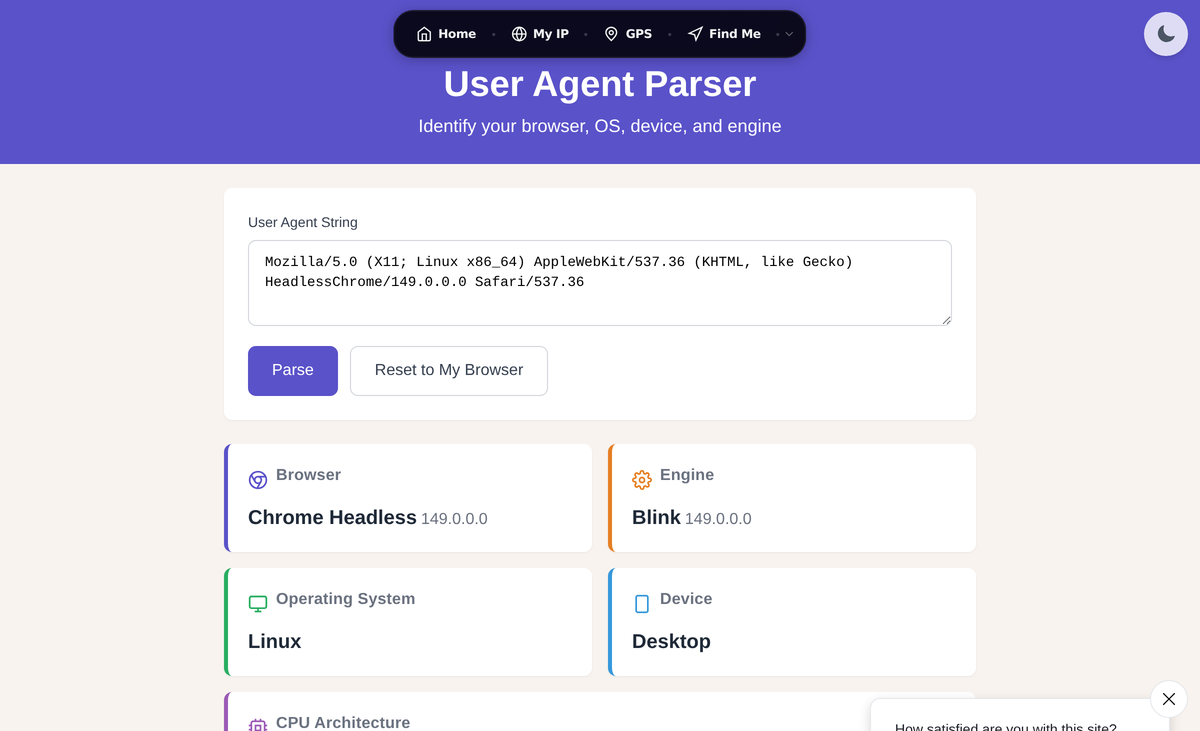
Most guides stop there and tell you to install a user agent switcher "for privacy." That advice is backwards more often than not. This guide explains what the string actually contains, why it looks the way it does, how sites really use it, and the part that matters most: changing your user agent usually makes you easier to track, not harder. You can see the exact string your browser is sending right now with our User Agent tool, and the full request alongside it with our HTTP Headers tool.
My take in one sentence: the user agent string is a low-value identifier on its own, but a spoofed or mismatched one is a high-value one, so leave it alone unless you are running a hardened anti-fingerprinting browser that changes it for you.
What Is a User Agent String?
A user agent string is a plain-text value sent in the User-Agent HTTP request header by your browser, and by any other HTTP client such as a phone app, a download manager, or a script. Its original purpose was simple: tell the server what software is asking, so the server can respond appropriately.
Here is a typical desktop Chrome user agent:
Mozilla/5.0 (Windows NT 10.0; Win64; x64) AppleWebKit/537.36 (KHTML, like Gecko) Chrome/150.0.0.0 Safari/537.36If that looks like a pile of contradictory claims, it is. The same string says Mozilla, AppleWebKit, KHTML, Gecko, Chrome, and Safari. To understand why, you need a short history lesson, then the rest of the page is practical.
A Short History of Why It Looks Like This
The clean beginning
Early browsers sent something readable. NCSA Mosaic, one of the first graphical browsers, identified itself plainly:
Mosaic/0.9Product name, version number, done.
The compatibility arms race
Netscape Navigator used the internal codename "Mozilla" and added more detail. Because Netscape supported features Mosaic did not, servers started checking the string and sending richer pages only to browsers that said "Mozilla." When Internet Explorer arrived, Microsoft wanted those same rich pages, so IE claimed to be Mozilla compatible:
Mozilla/2.0 (compatible; MSIE 3.0; Windows 95)That set the pattern for the next thirty years: a new browser pretends to be the older ones so it keeps receiving the good content. When WebKit browsers (Safari, then Chrome) arrived, they inherited the whole stack of claims. Chrome appends its real name at the end while still carrying Mozilla, AppleWebKit, and Safari tokens. Edge piles on Edg after claiming to be Chrome. The phrase "KHTML, like Gecko" is there because WebKit was forked from KDE's KHTML engine and needed to claim Gecko (Firefox engine) compatibility to be served correctly.
The takeaway: almost everything before the real browser name is historical sediment. Servers learned to read it, so browsers never dared remove it.
Anatomy of a Modern User Agent String
Here is the same desktop Chrome string, broken into parts:
Mozilla/5.0 (Windows NT 10.0; Win64; x64) AppleWebKit/537.36 (KHTML, like Gecko) Chrome/150.0.0.0 Safari/537.36| Component | What it means |
|---|---|
Mozilla/5.0 | Legacy compatibility token. Every modern browser sends it. It tells you nothing. |
(Windows NT 10.0; Win64; x64) | Operating system platform: Windows 10 or 11, 64-bit. Note Windows 11 still reports NT 10.0. |
AppleWebKit/537.36 | Rendering engine token (Blink, Chromium's fork of WebKit). Frozen at 537.36 for years. |
(KHTML, like Gecko) | Compatibility claim for KHTML and Gecko based content. |
Chrome/150.0.0.0 | The real browser and major version. The .0.0.0 is intentional (see reduction below). |
Safari/537.36 | WebKit compatibility token. |
Mobile strings carry a device class
Phones add a hint about form factor, but far less than they used to:
iPhone (Safari):
Mozilla/5.0 (iPhone; CPU iPhone OS 18_7 like Mac OS X) AppleWebKit/605.1.15 (KHTML, like Gecko) Version/26.0 Mobile/15E148 Safari/604.1Android (Chrome):
Mozilla/5.0 (Linux; Android 10; K) AppleWebKit/537.36 (KHTML, like Gecko) Chrome/150.0.0.0 Mobile Safari/537.36That Android 10; K is not a bug and it is not your real phone. Chrome now reports a frozen Android version of 10 and a frozen device model of the single letter K for every Android device, regardless of what you actually own. That is the User-Agent Reduction at work, covered below.
You can inspect your own string and see it parsed into these fields with our User Agent tool.
How Websites Actually Use Your User Agent
Content and layout decisions
- Responsive fallbacks: serving a mobile layout when the string says
Mobile, mostly as a backup to real responsive CSS. - Download pages: offering the right installer, a
.exefor Windows, a.dmgfor macOS, a.debfor Debian and Ubuntu. - Feature fallbacks: picking a video codec or a compatibility path when JavaScript feature detection is not available yet.
Analytics
Tools like Google Analytics and Matomo parse the string to report browser market share, OS distribution, and the desktop versus mobile split. This is the most common honest use and it does not need to identify you individually.
Bot detection
The string is one signal among many for spotting automated traffic. Real crawlers identify themselves: Googlebot and Bingbot say so in plain text. A request with no user agent, or one whose claim conflicts with the connection's TCP fingerprint (says Chrome on Windows, behaves like a Linux script), gets flagged. If you run a site, you can confirm a crawler is genuine with a reverse lookup using our Reverse DNS tool, real Googlebot IPs resolve to hostnames ending in googlebot.com or google.com.
Ad targeting and fingerprinting
Advertisers use device and browser data for targeting, for example showing premium-device campaigns to the newest iPhones. This is also where privacy starts to matter, because the same fields that pick an ad help build a fingerprint.
The Privacy Truth Most Guides Get Wrong
This is the section the thin "switch your user agent" articles skip, and it is the whole point.
How much does the string actually leak?
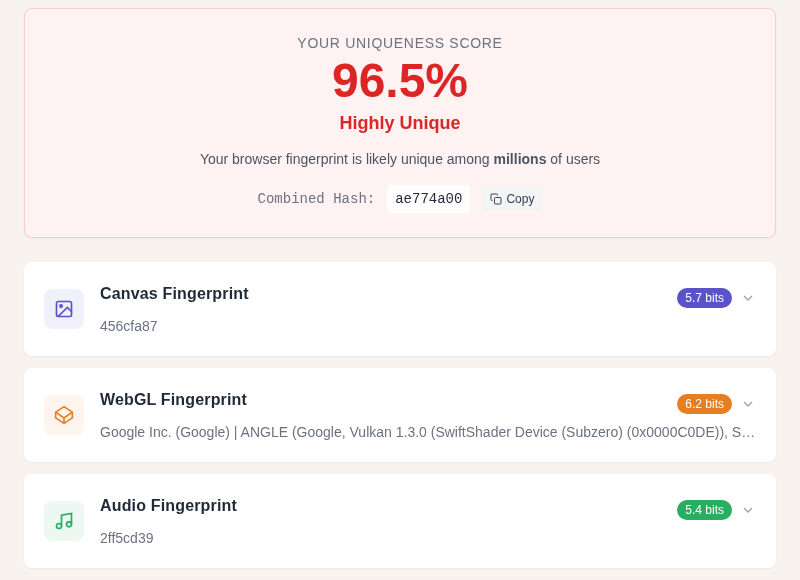
On its own, the user agent string carries roughly 10 to 11 bits of entropy, according to the original EFF Panopticlick study and later fingerprinting research. Ten bits means it can sort visitors into about one thousand buckets. That is meaningful but not unique. It becomes a problem only when combined with other signals, screen resolution, installed fonts, the WebGL renderer, time zone, language, audio stack. Stack enough of those and modern fingerprinting reaches 33 or more bits, which is enough to single you out of the entire human population. Our Browser Fingerprint tool shows how identifiable your specific browser is across these signals.
> To remember: your user agent is one ingredient in a fingerprint, not the fingerprint itself. Removing the dish from the menu does not help if the other ingredients still smell the same.
Why spoofing usually backfires
Here is the counterintuitive part. Fingerprinting does not care whether your user agent is "revealing." It cares whether it is rare and consistent.
- A rare string is a louder fingerprint. If 60 percent of visitors send a stock Chrome-on-Windows string and you send a hand-edited string claiming to be Chrome 84 on a Linux box nobody uses, you just became the most identifiable person on the page. You traded a common signal for a unique one.
- Inconsistency gives you away. Your spoofed string says Windows, but your JavaScript
navigator.platform, your fonts, and your TCP behavior say macOS. That mismatch is a tell. Bot-detection systems are built to catch exactly this, and so are trackers. - Changing it does not break the link. Research on fingerprint stability found that when a user changes one tracked property, a matching algorithm re-links the new fingerprint to the old one with about 99 percent accuracy. Rotating your user agent while everything else stays the same is close to useless against a serious tracker.
The honest verdict: a naive user agent switcher makes you easier to track, not harder. It is fine for compatibility testing or scraping. It is not a privacy tool.
What does help
The thing that actually reduces user agent leakage is the opposite of standing out: looking like everyone else. That is the design goal behind the Tor Browser and Firefox's privacy.resistFingerprinting mode, which make every user report the same generic string so no one is distinguishable. The win comes from blending into a large crowd, not from inventing a unique disguise.
How the Browsers Are Reducing the String
The browser makers reached the same conclusion and started shrinking what the string reveals. The detail below is current as of June 2026; browser versions increment roughly monthly, so the version numbers move while the structure holds.
Chrome: User-Agent Reduction (finished)
Google's User-Agent Reduction rolled out in phases and is now complete. Reduced strings ship by default. Three things were cut:
- Exact OS version is frozen. Every Windows machine reports
Windows NT 10.0, every Mac reportsMac OS X 10_15_7, every Android reportsAndroid 10. - Device model is gone on Android, replaced by the single letter
K. - Minor browser version is zeroed, so
Chrome/150.0.6099.71becomesChrome/150.0.0.0. Only the major number (150) ever changes.
Before and after, using the MDN example pattern:
Before reduction (Android):
Mozilla/5.0 (Linux; Android 16; Pixel 9) AppleWebKit/537.36 (KHTML, like Gecko) Chrome/150.0.12.45 Mobile Safari/537.36After reduction (Android):
Mozilla/5.0 (Linux; Android 10; K) AppleWebKit/537.36 (KHTML, like Gecko) Chrome/150.0.0.0 Mobile Safari/537.36Firefox: the rv:109 freeze
Firefox froze the rv: token at rv:109.0 starting with Firefox 110. The reason was not privacy, it was a bug: sites that sniffed for rv:11 were misreading new Firefox versions as Internet Explorer 11 and breaking. The real version still appears at the end of the string. Firefox also limits OS version detail and, with privacy.resistFingerprinting enabled, reports a uniform spoofed string.
Mozilla/5.0 (Windows NT 10.0; Win64; x64; rv:109.0) Gecko/20100101 Firefox/152.0Note that rv:109.0 no longer matches Firefox/152.0. That is the freeze, working as intended.
Safari: a frozen OS version, a real browser version
Safari does not run a Chrome-style reduction program, but it has long held the macOS version reasonably steady and is conservative about device detail. One precise nuance worth knowing, because it trips up device-detection code: Chrome on a Mac freezes the OS token to Mac OS X 10_15_7, while Safari on the same Mac reports the real macOS major version. If your analytics shows a wall of Macs stuck on "10.15," that is Chrome's reduction, not a fleet of ancient hardware.
Side by side: how each browser handles it
| Browser | OS version in UA | Device model | Browser version | Notes |
|---|---|---|---|---|
| Chrome / Chromium | Frozen (Win 10.0, Mac 10_15_7, Android 10) | Frozen (K on Android) | Major only (150.0.0.0) | Reduction complete, default |
| Edge | Same as Chrome (Chromium based) | Frozen | Major only, plus Edg/ token | Inherits Chrome's reduction |
| Firefox | Limited, can be spoofed uniform | Not exposed | Real version at end; rv: frozen at 109 | resistFingerprinting for full uniformity |
| Safari | Real macOS major version | Not exposed | Real Version/ token | No phased reduction program |
The direction of travel is clear: the user agent string is being hollowed out, and the structured detail is moving to a system the server has to ask for.
Client Hints: the modern replacement
Instead of broadcasting everything on every request, the newer model makes the browser send a thin string by default and lets the server request specifics only when it needs them. That mechanism is User-Agent Client Hints. It sits on top of the general HTTP Client Hints framework defined in RFC 8942, and its header values use HTTP structured fields (RFC 8941). User-Agent Client Hints itself is a WICG specification, not RFC 8942, a detail older explainers get wrong.
By default a Chromium browser sends only low-entropy hints:
Sec-CH-UA: "Chromium";v="150", "Google Chrome";v="150", "Not.A/Brand";v="99"
Sec-CH-UA-Mobile: ?0
Sec-CH-UA-Platform: "Windows"
If a server wants more, such as the full version or the architecture, it asks with a response header and the browser may then send it on the next request:
Accept-CH: Sec-CH-UA-Full-Version-List, Sec-CH-UA-Arch, Sec-CH-UA-Platform-VersionYou can also read these from JavaScript:
navigator.userAgentData
// { brands: [...], mobile: false, platform: "Windows" }

await navigator.userAgentData.getHighEntropyValues(["platformVersion", "architecture"])
// resolves to the detailed values, if the browser grants them
Why this is better for privacy: the default surface is smaller, the detailed bits are opt-in per server, and the browser controls what it hands over. It does not make you anonymous, but it stops every random site from passively collecting your full OS build on the first byte.
How to View and Change Your User Agent
View it
The fastest way is our User Agent tool, which shows the raw string and parses it into browser, engine, OS, and device fields. To see it next to every other header your browser sends, use HTTP Headers. In any browser, you can also open the developer console (F12) and run:
navigator.userAgentChange it (for testing, not privacy)
Built into the browser, no extension needed:
- Chrome / Edge: DevTools (F12), open the three-dot menu, More tools, Network conditions, untick "Use browser default," then pick or type a user agent.
- Firefox: type
about:config, accept the warning, searchgeneral.useragent.override, and set your custom string. Delete the preference to revert.
In code, just set the header:
import requests

headers = {
    "User-Agent": "Mozilla/5.0 (Windows NT 10.0; Win64; x64) AppleWebKit/537.36 (KHTML, like Gecko) Chrome/150.0.0.0 Safari/537.36"
}
response = requests.get("https://example.com", headers=headers)
These are the right tools for compatibility testing, debugging device detection, or polite scraping. Reread the privacy section before you treat any of them as a privacy feature.
What actually moves the needle on tracking
A VPN does not touch your user agent, but it hides your IP address, which is the single strongest passive identifier most people leak. Pairing IP privacy with a browser that resists fingerprinting (so it normalizes your user agent for you) is the combination that helps. See what your IP currently exposes with our My IP page, and test how unique your browser is overall with Browser Fingerprint.
Common User Agent Strings Reference
Current desktop and mobile strings as of June 2026 (latest stable: Chrome 150, Firefox 152, Edge 149, Safari 26.5). Reduced desktop strings show the major version only, so only the lead number moves over time.
| Browser | User agent string |
|---|---|
| Chrome (Windows) | Mozilla/5.0 (Windows NT 10.0; Win64; x64) AppleWebKit/537.36 (KHTML, like Gecko) Chrome/150.0.0.0 Safari/537.36 |
| Chrome (Android) | Mozilla/5.0 (Linux; Android 10; K) AppleWebKit/537.36 (KHTML, like Gecko) Chrome/150.0.0.0 Mobile Safari/537.36 |
| Firefox (Windows) | Mozilla/5.0 (Windows NT 10.0; Win64; x64; rv:109.0) Gecko/20100101 Firefox/152.0 |
| Edge (Windows) | Mozilla/5.0 (Windows NT 10.0; Win64; x64) AppleWebKit/537.36 (KHTML, like Gecko) Chrome/149.0.0.0 Safari/537.36 Edg/149.0.0.0 |
| Safari (macOS) | Mozilla/5.0 (Macintosh; Intel Mac OS X 15_7) AppleWebKit/605.1.15 (KHTML, like Gecko) Version/26.0 Safari/605.1.15 |
| Safari (iPhone) | Mozilla/5.0 (iPhone; CPU iPhone OS 18_7 like Mac OS X) AppleWebKit/605.1.15 (KHTML, like Gecko) Version/26.0 Mobile/15E148 Safari/604.1 |
| Googlebot | Mozilla/5.0 (compatible; Googlebot/2.1; +http://www.google.com/bot.html) |
| Bingbot | Mozilla/5.0 (compatible; bingbot/2.0; +http://www.bing.com/bingbot.htm) |
Frequently Asked Questions
What is a user agent string in one sentence?
It is a line of text your browser sends in the User-Agent header on every web request that names the browser, its version, your operating system, and a rough device class so the server knows what is asking. See yours with the User Agent tool.
Can a website see my exact device and OS from my user agent?
Less than it used to. Chrome's User-Agent Reduction froze the OS version and replaced the Android model with the letter K, so a current Chrome string cannot tell a site your phone model or your exact OS build. A server can request more detail through Client Hints, but that is opt-in per site rather than broadcast to everyone.
Does changing my user agent improve my privacy?
Usually no, and it often makes things worse. Fingerprinting keys on rarity and consistency, so a hand-edited or unusual string makes you stand out, and a string that contradicts your other browser signals is a clear tell. Trackers re-link a changed fingerprint to the old one with about 99 percent accuracy. Real protection comes from blending in, which is what the Tor Browser and Firefox resistFingerprinting do automatically.
How much can a tracker learn from my user agent alone?
Roughly 10 to 11 bits of entropy, enough to sort visitors into about a thousand groups but not to identify one person. It becomes dangerous when combined with screen size, fonts, time zone, and the rendering stack, where total fingerprints reach 33 or more bits. Test how unique your browser is with Browser Fingerprint.
Why does my Mac show "Mac OS X 10_15_7" in Chrome when I am on a newer version?
That is Chrome's User-Agent Reduction freezing the macOS token, not stale software. Safari on the same Mac reports the real macOS major version, which is why analytics often shows a cluster of "10.15" Macs that are actually running current hardware in Chrome.
Is "Mozilla/5.0" at the start of my string a security problem?
No. It is a legacy compatibility token that every modern browser sends, left over from the 1990s browser wars. It carries no information about you and cannot be removed without breaking sites that still sniff for it.
How do I change my user agent for testing without an extension?
In Chrome or Edge, open DevTools, go to Network conditions, untick "Use browser default," and set a custom string. In Firefox, set general.useragent.override in about:config. Both are meant for compatibility testing and device-detection debugging, not for privacy.
Do search engine bots have honest user agents, and can I trust them?
Real crawlers like Googlebot and Bingbot identify themselves in plain text, but the string alone can be faked. Confirm a crawler is genuine with a reverse DNS lookup using our Reverse DNS tool. Legitimate Googlebot IPs resolve to hostnames ending in googlebot.com or google.com.
Key Takeaways
- A user agent string identifies your browser, engine, OS, and device class to every site you visit, and its tangled format is decades of compatibility hacks layered on top of each other.
- On its own it leaks about 10 to 11 bits of entropy, so it is one fingerprinting ingredient, not the whole fingerprint.
- Spoofing it naively makes you more identifiable, not less, because trackers key on rarity and consistency and re-link changed fingerprints with roughly 99 percent accuracy.
- The browsers are deliberately shrinking the string: Chrome's reduction is finished, Firefox froze
rv:at 109, and Safari freezes the OS version, with structured Client Hints replacing the rest on demand. - Real protection comes from blending in (Tor Browser, Firefox
resistFingerprinting) and from hiding your IP, not from a unique disguise. - Check what you send with the User Agent and HTTP Headers tools, test your uniqueness with Browser Fingerprint, and see what your IP exposes on My IP.
About the author: Bello Moussa Amadou builds and maintains the network and privacy tools at WhatIsMyLocation. He writes about how the everyday plumbing of the web, headers, DNS, IP geolocation, and fingerprinting, actually works in practice. Connect on LinkedIn.
Related Articles:

WhatIsMyLocation Team
Our team of network engineers and web developers builds and maintains 25+ free networking and location tools used by thousands of users every month. Every article is reviewed for technical accuracy using real-world testing with our own tools.
Related Articles
Try Our Location Tools
Find your IP address, GPS coordinates, and more with our free tools.